New Features and Enhancements in v4.9
In this article:
New Features:
1. Preferred First Name for Patients
2. Create a Full Patient Record Directly from Appointment Booking
3. Patient Address Included in iCal exports
Enhancements:
-
Canada only – Newly added ADP Application for Funding Hearing Devices (Released March 1st)
-
Canada only – Newly added ADP Application for Hearing Aids Attestation Sheet (Released March 1st)
-
Canada only – WSIB forms generated from PATIENT > FORMS now include “WSIB Provider ID”
Other Quality Improvements and Minor Fixes:
-
Corrected ICD codes on HCFA claims, automatically adding audiogram records to the patient
-
Improved the CLAWBACKS (EXCEL ONLY) report to reflect clawbacks linked to invoices as unapplied payments
-
CareCredit refunds are correctly displaying in PATIENT > SALES HISTORY
-
Removed incorrect private insurer items from the PATIENT AR STATEMENT (CLAIMS TRACKING)
-
Restored 3rd PARTY LEDGER > TRANSACTION HISTORY accessibility
-
Inventory filtering performance with QuickFind improvements
-
Updated Heidi Health logos
Features Enhancements:
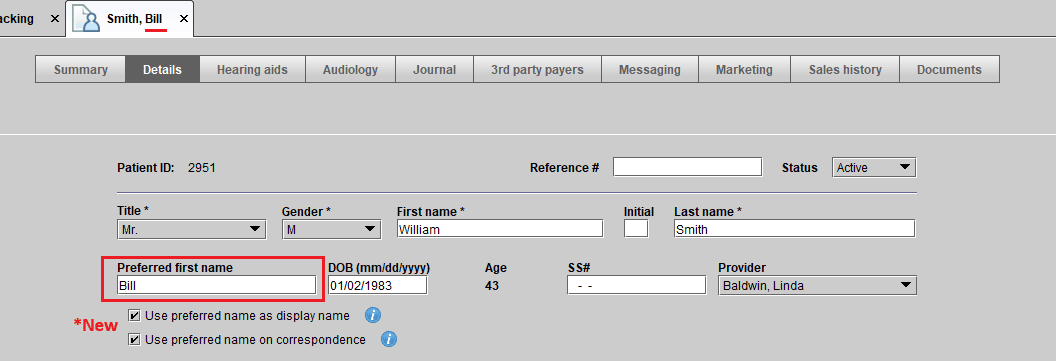
1. Patient Preferred First Name
Blueprint OMS now includes a new “Preferred First Name” field within the patient record, allowing practices to more accurately reflect how patients wish to be addressed.
This feature provides the ability to:
- Record a patient’s preferred first name separately from their legal first name
- Display the preferred first name throughout Blueprint OMS in place of the legal first name
- Choose whether the preferred first name appears in patient correspondence
This enhancement supports a more personalized and respectful patient experience, helping staff address patients consistently and appropriately across appointments, communications, and day-to-day interactions.
For compliance and billing accuracy, legal documents — including invoices and insurance-related materials — will continue to display the patient’s legal first name.
2. Create Patient Option within Event creation
Blueprint OMS now allows users to create a completely new patient file directly from the appointment booking screen.
In addition to the existing “Quick Add” option, users can now select a new “Patient” option within the Select Patient dialog during appointment creation to enter patient details at the time of scheduling.
What this means for your clinic:
- Fewer workflow interruptions – No need to leave the scheduling screen to create a full patient record
- Improved front-desk efficiency – Capture complete and accurate patient information during the initial booking call
- Reduced duplicate work – Eliminate the need to return later to expand a Quick Add into a full chart
- Stronger data accuracy from day one – Ensure all required demographic and contact information is properly recorded at the start
This enhancement streamlines the booking process while giving clinics greater flexibility to choose between a quick placeholder record or a fully completed patient file — all without breaking workflow.

3. Patient Address Included in iCal Exports
Blueprint OMS now includes patient address information in iCal appointment exports.
For providers who are configured to allow PHI (Private Health Information) in their iCal exports, the patient’s address will automatically appear in the Notes section of the exported calendar appointment.
What this means for your clinic:
- Better support for mobile and in-home care providers – Quickly access visit locations directly from your synced calendar
- Improved efficiency on the go – No need to log back into Blueprint OMS to confirm a patient’s address
- Reduced risk of errors – Ensure accurate location details are available when planning travel routes
This enhancement is especially valuable for clinics that provide services in patients’ homes, helping streamline scheduling and improve day-to-day operational efficiency while maintaining configurable PHI controls.

—
Have questions about these features? Our support team is always ready to assist! Get started by visiting our Help Center.
Related Articles

A Thanksgiving gift from Blueprint OMS 🦃🍂

Happy Thanksgiving from the Blueprint Solutions team! As the holiday season approaches, we want to thank you for...
Read MoreOctober Audiology Awareness Month 👂🍂 – New email template!

Happy October Audiology Awareness Month from the Blueprint Solutions team! 👂🍂 As a way to say thank you...
Read More
No comments